

ERP Financial Information System (FIS) – Detailed Case Study Purpose
FIS module is the financial backbone of the ERP system, ensuring accurate recording, secure processing, and insightful reporting of all financial transactions. It empowers decision-makers with data-driven visibility and accountants with automation and control.
Chart of Accounts (CoA)
Function:
Defines the master structure of accounts in a 3-level hierarchy:
- Level 1: Control Accounts
E.g., Assets, Liabilities, Income, Expense - Level 2: Subsidiary Accounts
E.g., Under “Assets”: Current Assets, Fixed Assets - Level 3: Sub-Subsidiary Accounts
E.g., Under “Current Assets”: Cash, Bank Account, Receivables
Use Case Example:
Company XYZ defines:
- Control A/C: Assets
└ Subsidiary: Current Assets
└ Sub-Subsidiary: Meezan Bank Current A/C
Benefits:
- Modular structure for easy classification
- Enables group-wise or item-wise reporting
- Flexible for any industry (manufacturing, service, retail)
Bank Receipt Voucher – ERP Financial System
Overview
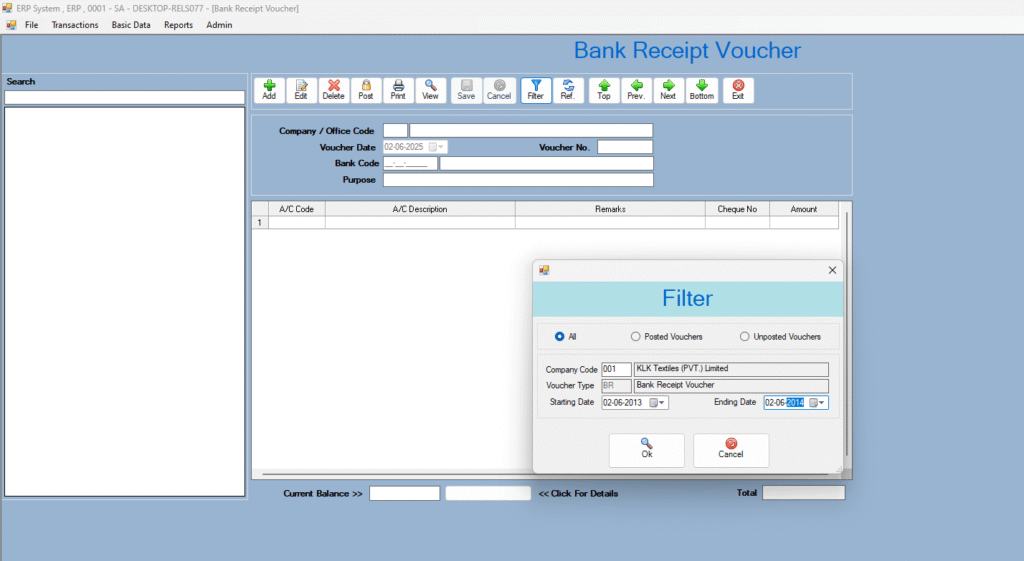
The Bank Receipt Voucher (BRV) module is used to record all money received by the company through bank accounts — such as customer payments, loan disbursements, or investment income. It ensures proper posting to the general ledger and supports financial transparency.
Key Features
- Selection of bank account and receipt type (cheque, online, etc.)
- Debit/Credit automation in General Ledger
- Fields for payer name, amount, narration, and document attachment
- Role-based user control and voucher approval
- Appears in Bank Book, Ledger, and Cash Flow Reports
Use Case Example
Company ABC receives Rs. 250,000 from “Tech Solutions” against an invoice.
Voucher:
- Debit: Meezan Bank Account
- Credit: Accounts Receivable – Tech Solutions
- Narration: Invoice INV-1052 payment
- Status: Posted and reflected in bank and customer ledger
Benefits
- Accurate tracking of bank inflows
- Supports audit compliance and approval trail
- Speeds up bank reconciliation
- Real-time updates to customer ledgers and MIS reports
Conclusion
The BRV module ensures that all bank receipts are recorded securely, posted correctly, and integrated with financial reports — helping companies maintain accurate and reliable accounting records.
| Voucher Type | Purpose |
|---|---|
| Bank Receipt Voucher | Money received in company’s bank accounts |
| Bank Payment Voucher | Payments made via bank (e.g., to vendors) |
| Cash Receipt Voucher | Cash received in office |
| Cash Payment Voucher | Cash payments like office petty cash |
| Journal Voucher | Non-cash entries like depreciation, adjustment |
Smart Features:
- Auto Voucher Number Generation — Sequential numbers reduce manual entry errors.
- Multi-Level Filter for Viewing:
- Posted / Unposted
- Specific Date / Period
- By Voucher Type / Number
- Admin can Edit Posted Entries
Use Case:
User enters a bank payment to a supplier → gets auto-number → gets posted → appears in bank book → appears in ledger → appears in financial statements.
Benefits:
- Eliminates paper-based entries
- Accelerates month-end closing
- Ensures audit-compliant recordkeeping
Bank Payment Voucher – ERP Financial System
Overview
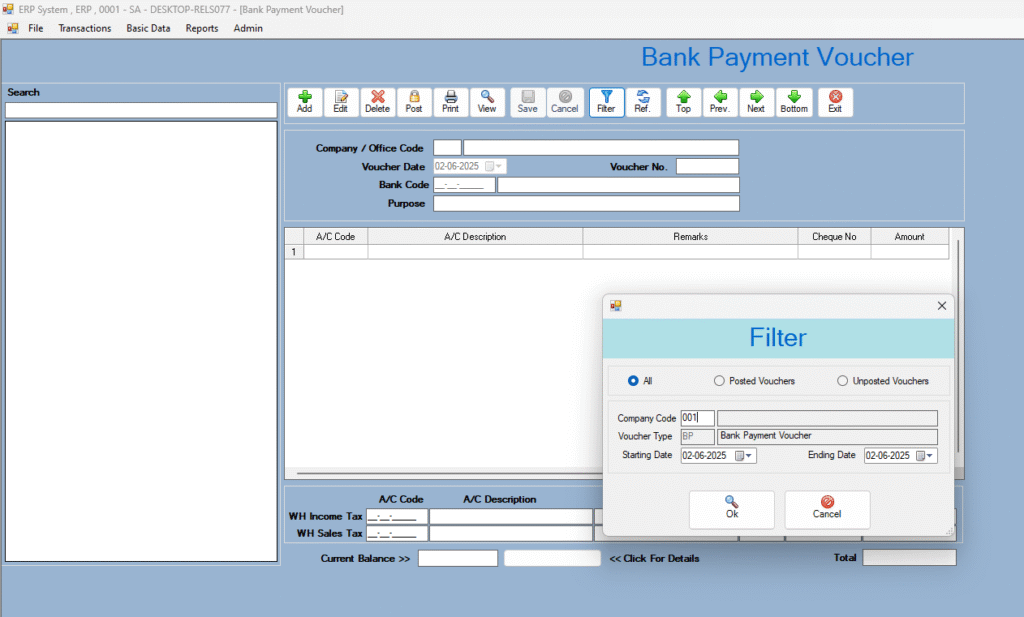
The Bank Payment Voucher (BPV) module records and manages all payments made through company bank accounts. It ensures accuracy, traceability, and control over financial outflows.
Key Features
- Bank selection and payment method (cheque/online)
- Account mapping (auto debit/credit in ledger)
- Role-based user access and approvals
- Attachment of supporting documents (e.g., invoices)
- Real-time integration with bank book, ledger, and reports
Use Case Example
Company ABC pays Rs. 150,000 to “Quick Supplies” via Meezan Bank.
Voucher:
- Debit: Office Supplies
- Credit: Meezan Bank
- Narration + invoice attachment
- Auto-posted to ledger and MIS reports
Benefits
- Accurate and secure payment recording
- Audit trail with user logs
- Faster bank reconciliation
- MIS-ready reports for decision-makers
Conclusion
The BPV module improves payment processing, reduces errors, and provides complete transparency for all bank-based financial transactions.
Employee Personal Information – ERP HR Module
Overview
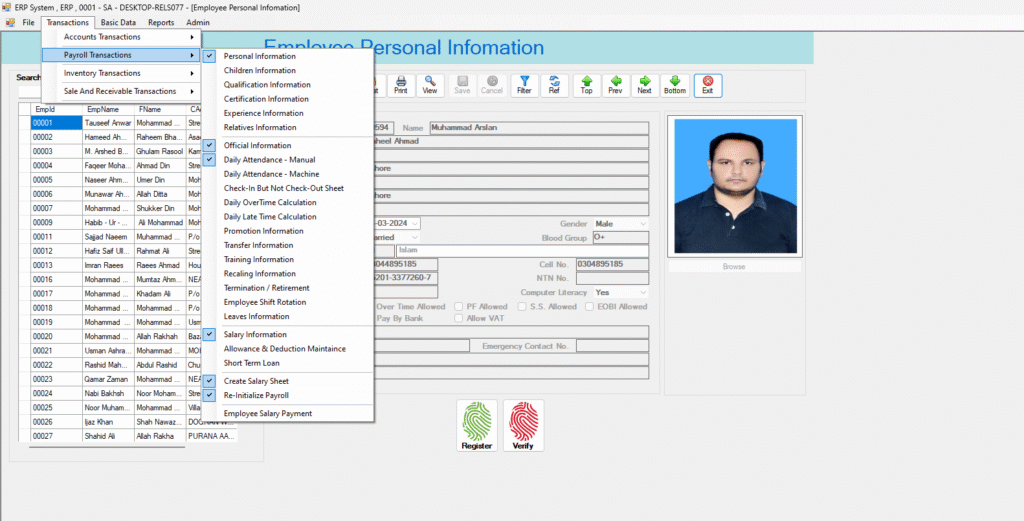
The employee Personal Information module manages and stores all essential employee details in a centralized, secure database. It ensures easy access, compliance, and accurate HR recordkeeping.
Key Features
- Personal details: name, gender, DOB, CNIC, marital status
- Contact info: address, phone, email, emergency contact
- Employment info: employee ID, designation, department
- Document uploads: CNIC, degrees, certificates
- Photo upload and ID card generation
- Editable only by authorized HR/admin users
Use Case Example
New hire Ali Raza is added to the ERP system with full personal and job-related information. His CNIC, educational certificates, and emergency contact are uploaded. The system generates his Employee ID and stores his data securely.
Benefits
- Centralized & secure employee records
- Quick search & retrieval of employee data
- Reduces paperwork and duplication
- Essential for payroll, attendance, and compliance modules
Conclusion
The Employee Personal Information module builds the foundation for all HR processes by providing reliable and structured employee data management.
Journal Voucher – ERP Financial System
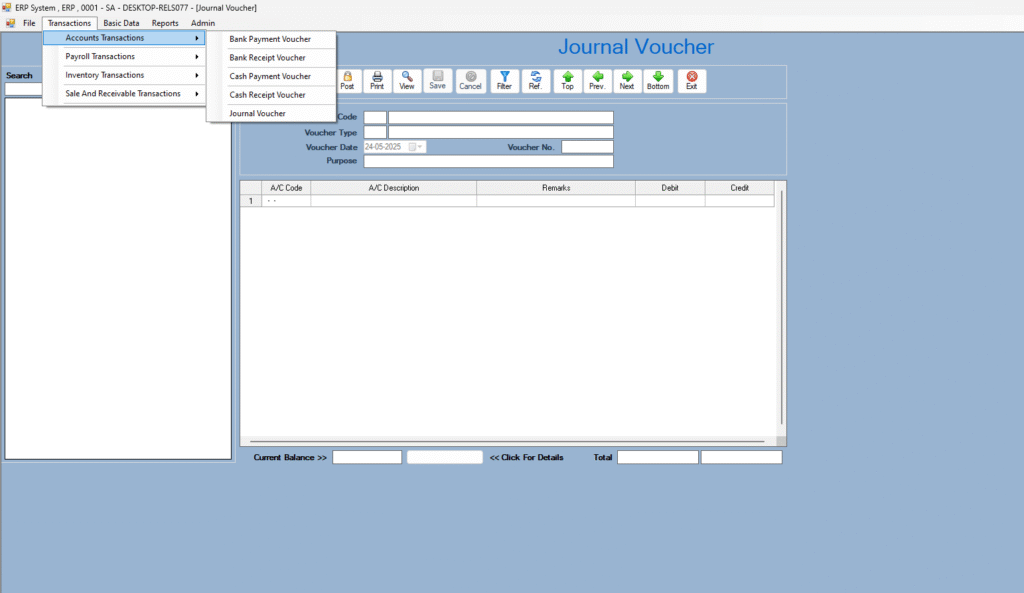
Overview
The Journal Voucher (JV) module is used to record non-cash, adjusting, or internal accounting entries. It ensures accurate ledger posting for events like depreciation, provisions, inter-department adjustments, and accruals.
Key Features
- Manual entry of debit and credit accounts
- Narration for transaction explanation
- Support for multiple debit/credit lines in one voucher
- Auto-check for debit-credit balance
- Voucher numbering, date control, and user-level approval
- Only authorized users can edit/post/delete
Use Case Example
Finance team records monthly depreciation:
- Debit: Depreciation Expense – Rs. 50,000
- Credit: Accumulated Depreciation – Rs. 50,000
- Narration: Depreciation entry for June 2025
This entry is posted and reflected in the Profit & Loss and Balance Sheet.
Benefits
- Enables accurate period-end adjustments
- Ensures proper audit trail and transparency
- Helps maintain accurate financial reports
- Fully integrated with GL, Trial Balance, and MIS reports
Conclusion
The Journal Voucher module is essential for maintaining accounting accuracy by recording internal adjustments and non-cash transactions within the ERP environment.
User Maintenance – ERP Security Module
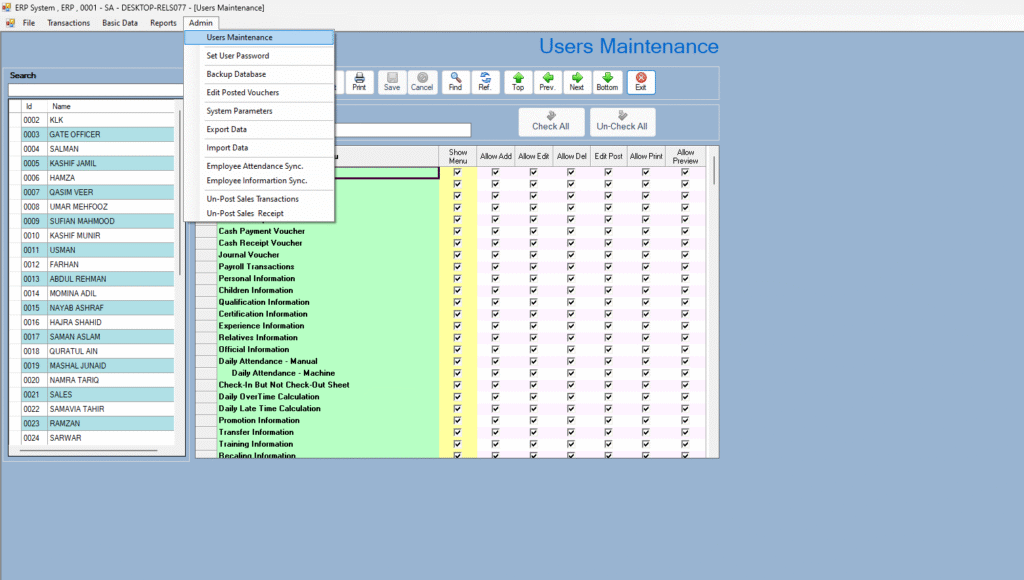
Overview
The User Maintenance module handles the creation, control, and security of ERP user accounts. It ensures that only authorized personnel can access specific modules and perform permitted actions within the system.
Key Features
- Unique User ID, username, encrypted password
- Role-based access control (admin, finance, HR, etc.)
- Module-wise and button-level permissions (Add/Edit/Delete/Post/Print)
- User status control (Active/Blocked)
- Audit trail logs for user activity
- Password change/reset policy
- Workstation/IP-level access control (if configured)
Use Case Example
The system administrator creates a user account for the finance officer:
- Username:
faheem.khan - Role: Finance Officer
- Access: Journal Voucher, Bank Payment, Trial Balance
- Restrictions: Cannot post or delete vouchers
- Audit logging: Enabled for all activities
Benefits
- Enhances system security and data integrity
- Prevents unauthorized access or actions
- Enables traceability of every user action
- Supports audit and compliance requirements
Conclusion
The User Maintenance module provides a robust framework for managing ERP users, enforcing access rules, and maintaining a secure and accountable working environment.
Custom Order – ERP Sales Module
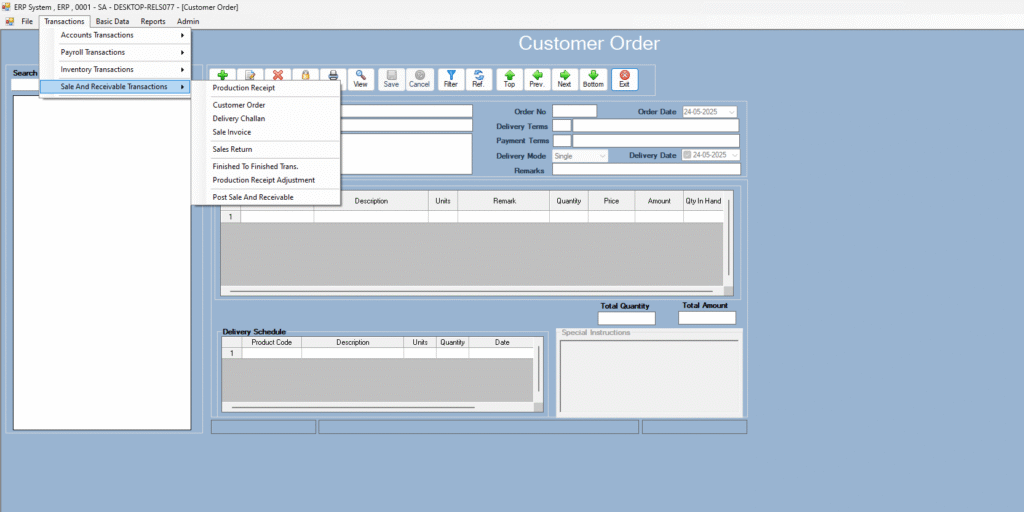
Overview
The Custom Order module is designed to handle non-standard or made-to-order sales requests that deviate from predefined product/service templates. It enables flexible order capturing, production coordination, and delivery scheduling based on client-specific requirements.
Key Features
- Capture of detailed customer requirements (size, specs, color, packaging)
- Dynamic item configuration (add-ons, materials, custom fields)
- Automatic generation of Job Cards or Work Orders
- Real-time cost estimation and delivery schedule
- Approval workflow for non-standard pricing or design
- Integration with Inventory, Production, and Invoicing modules
Use Case Example
A client orders custom-sized office tables with walnut finish and lockable drawers.
Sales team logs this custom order in ERP:
- Product: Office Table
- Dimensions: 5ft x 3ft
- Finish: Walnut Wood
- Add-ons: Drawer with lock
- Delivery: 12 working days
- Status: Approved by Production & Pricing
The order flows into the production module for manufacturing and triggers updates to the delivery schedule and cost sheet.
Benefits
- Simplifies handling of non-standard client orders
- Reduces miscommunication between sales and production
- Enables accurate cost tracking and delivery forecasting
- Improves customer satisfaction with tailored offerings
Conclusion
The Custom Order module adds flexibility to the ERP by allowing the organization to handle unique client demands while maintaining process control and efficiency.
Fabric Code – ERP Inventory Module
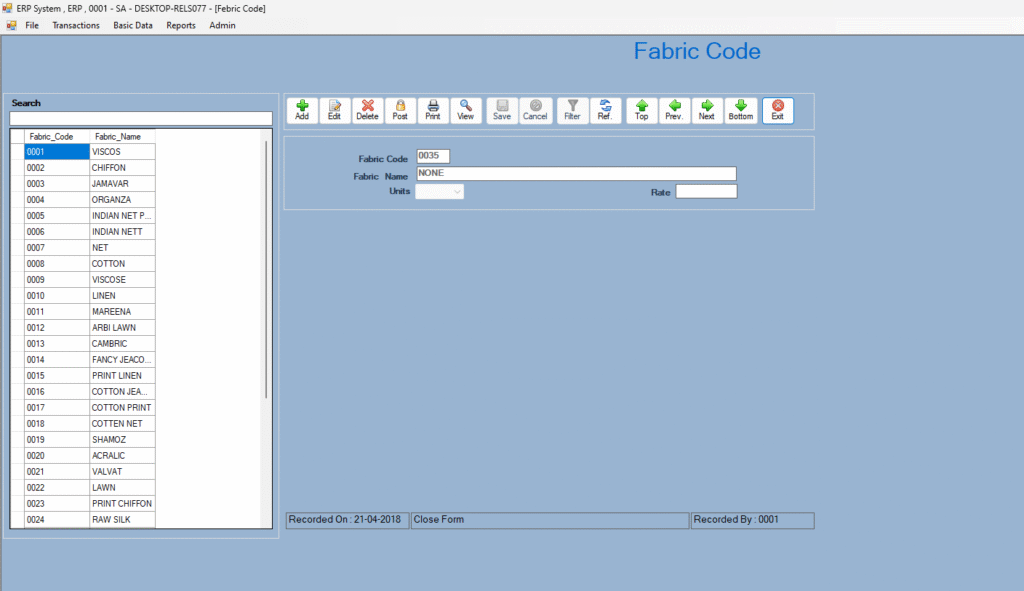
Overview
The Fabric Code module manages the cataloging and classification of fabrics used in production. It assigns a unique code to each fabric type, allowing precise tracking of material characteristics, stock levels, and usage across sales and manufacturing processes.
Key Features
- Unique Fabric Code generation (e.g.,
FAB-CHN-COT-220GSM) - Attributes: Fabric type, material (cotton, polyester, blend), GSM, color, width, supplier
- Linking with inventory stock, purchase, and production modules
- Real-time fabric availability tracking
- Barcode/QR code support for fabric rolls
- Fabric-based costing for BOM (Bill of Materials)
Use Case Example
A garment factory adds a new fabric:
- Code:
FAB-IND-COT-180GSM-NVY - Type: Cotton
- GSM: 180
- Color: Navy Blue
- Width: 58 inches
- Supplier: TexSource Pvt. Ltd.
This fabric is then used in a custom shirt order, automatically pulled into BOM costing and production planning.
Benefits
- Standardized fabric tracking
- Accurate inventory and procurement planning
- Faster fabric selection for custom orders
- Supports efficient costing and quality control
Conclusion
The Fabric Code module enables detailed tracking and standardization of fabrics, improving efficiency in procurement, production, and inventory control in textile-based industries.
Purchase Requisition – ERP Procurement Module
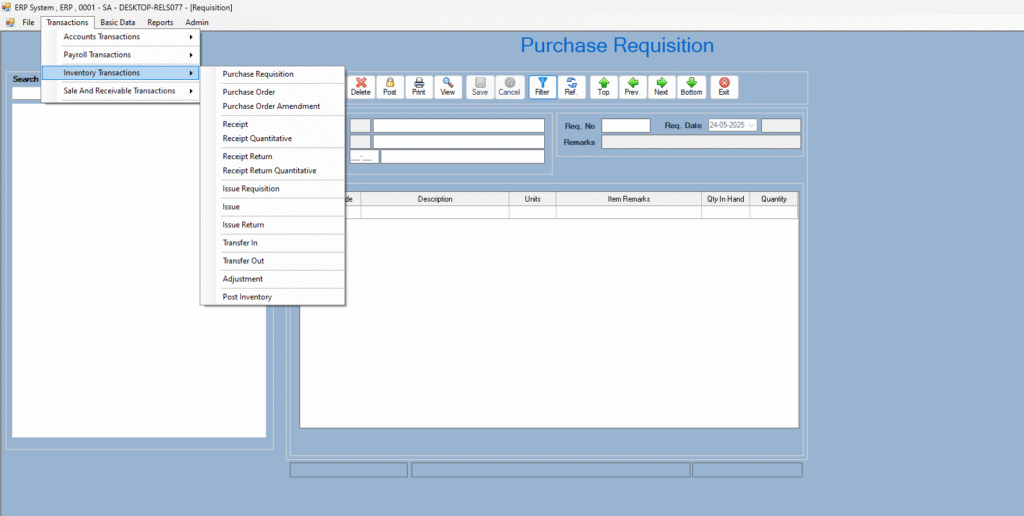
Overview
The Purchase Requisition (PR) module allows departments to formally request goods or services before a purchase order is issued. It ensures that all procurement begins with an internal need and goes through an approval workflow.
Key Features
- Department-wise PR creation with item details and justification
- Quantity, required date, and urgency-based classification
- Multi-level approval workflow based on roles and departments
- Real-time tracking of PR status (Pending, Approved, Rejected, Fulfilled)
- Integration with Inventory, Budgeting, and Purchase Order modules
- Option to attach technical specs or vendor quotes
- Alerts and notifications for approvers and requesters
Use Case Example
The Marketing department needs 500 branded pens for an event.
A PR is created specifying:
- Item: Branded Pens
- Quantity: 500
- Delivery Date: Within 10 days
- Purpose: Upcoming Expo Event
The PR is submitted for approval and once approved, it’s forwarded to the procurement team for vendor quotation and PO generation.
Benefits
- Promotes controlled and justified purchases
- Prevents unauthorized buying and budget overruns
- Ensures accountability and traceability
- Improves procurement efficiency and planning
- Streamlines departmental communication for material needs
Conclusion
The Purchase Requisition module is a critical part of any ERP system, enabling structured and approved demand generation for materials or services. It ensures transparency, compliance, and operational readiness across all departments.
Posting to General Ledger
Function:
After validation, vouchers are posted to the GL (General Ledger).
Every debit/credit flows directly into the respective A/C.
Validation Workflow:
- Draft voucher → Validated by authorized person → Posted to GL
Example:
Bank payment voucher of Rs. 50,000 to vendor is posted → Debit: Vendor A/C | Credit: Meezan Bank A/C
Benefits:
- Maintains accounting integrity
- No missed entries
- Segregation of duties through workflow
Real-Time Reports & MIS (Management Information System)
Dynamic Reports:
All reports are customizable with user-defined:
- Date ranges
- Account heads
- Cost centers
- Report layouts
Key Reports:
- Trial Balance
- General Ledger / Sub Ledger
- Cash Book / Bank Book
- Journal Book
- Activity Trial Balance
- Profit & Loss
- Balance Sheet
- Income Statement with Notes
- Aging Analysis (Receivables/Payables)
Use Case:
Finance Manager wants a Balance Sheet of May 2025 → Selects from UI → Chooses custom cost centers → Exports in PDF.
Benefits:
- No need for Excel
- Instant insights
- Auditor-ready reports in 1 click
Drill-Down Facility
Function:
Click on any report figure → See underlying ledger → Click again → See voucher → See user who posted it.
Example:
Trial balance shows “Accounts Payable: Rs. 150,000”
→ Click → Shows Ledger of Vendor A
→ Click → Shows Bank Payment Voucher posted by “Adeel” on 3 June 2025.
Benefits:
- Transparency
- Saves audit time
- Easy tracing of transactions
Notes to the Accounts (Auto Generated)
Function:
System generates textual notes for reports like:
- “Receivables include amount due from XYZ amounting to Rs. 50,000”
- “Fixed assets depreciated at 15% per annum”
Benefits:
- Helps annual reporting
- Complies with IFRS / Accounting Standards
User Security & Administration
Functionality:
- User IDs are auto-generated.
- Passwords are encrypted.
- Permissions managed on:
- Screen Level (e.g., Voucher Screen access)
- Button Level (e.g., Allow “Post”, Disallow “Delete”)
Audit Trail Includes:
- Action done (Add/Edit/Delete/Post)
- User who did it
- Date & Time
- Machine Name or IP
Benefits:
- Foolproof access control
- Accountability for every action
- Complete audit trail
Advanced Features & System Design
| Feature | Explanation |
|---|---|
| User Friendly Interface | Clean UI with tooltips and help messages |
| Validation Rules | Prevent invalid entries (e.g., negative amount, date mismatch) |
| Search & Lookup | Auto-complete fields and advanced search |
| Client/Server Architecture | Centralized database for secure operations |
| Multi-Branch Support | Manage data from all branches with consolidated reports |
| Data Sync & Backup | Scheduled backup, auto sync over LAN/WAN |
| Report Exporting | Excel, Word, PDF formats |
| Email Integration | Auto-send daily/weekly reports to management |
| Unlimited Users & Transactions | Highly scalable for large businesses |
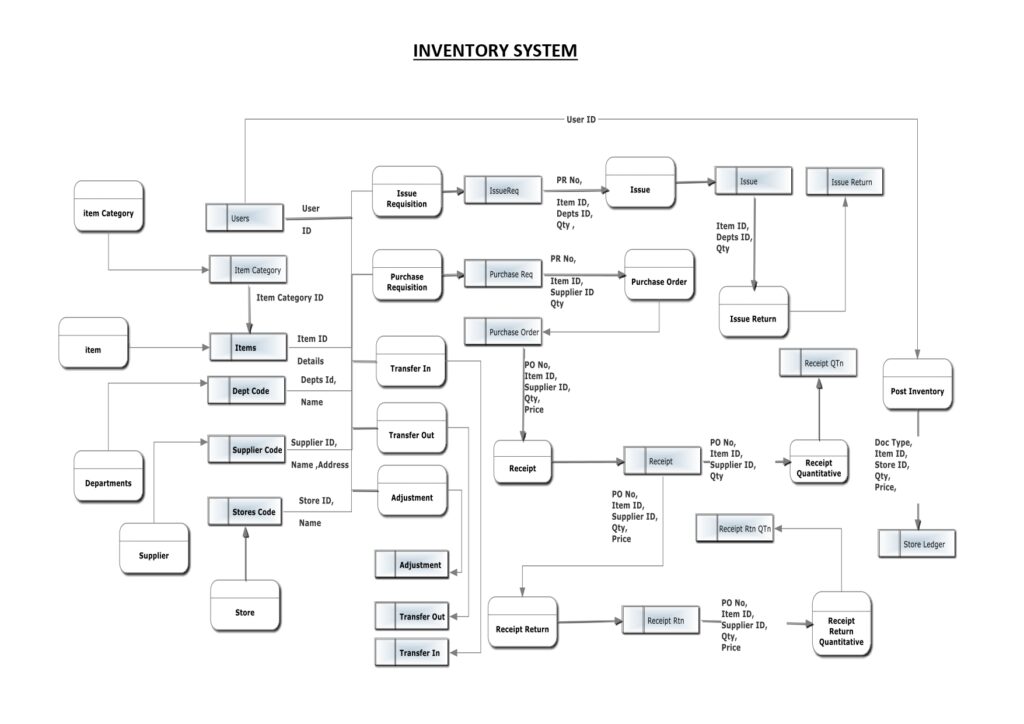
Conclusion:
The ERP FIS Module is not just an accounting tool — it’s an intelligent financial management engine that:
- Tracks every rupee
- Prevents fraud and human errors
- Simplifies audits
- Empowers managers with data
- Supports local and global compliance
Whether you are a small business or an enterprise, this FIS module will streamline your financial operations, bring real-time control, and enable better decision-making.